Commands
Orient Curve
 Orient On Curve
The OrientOnCrv command moves or copies and rotates objects along a curve using the curve direction for orientation.
Steps
- Select objects.
- Pick a base point.
- Select the orientation curve.
- Pick a new base point on the curve
Command-line options
OnCurve
Pick a base point on the curve. This allows moving the object along the curve while maintaining its orientation to the curve.
Copy: Specifies whether or not the objects are copied. A plus sign  appears at the cursor when copy mode is on.
The RememberCopyOptions command determines whether the selected option is used as the default.
Flip: Flips the direction of the oriented object on the target curve.
By default, the curve direction is used to orient the object.
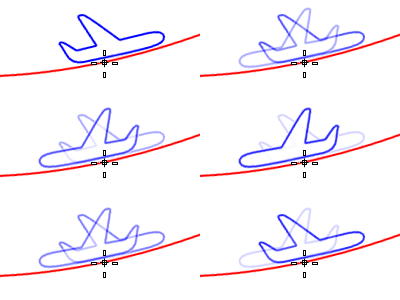
Perpendicular: Orients the object perpendicular to the curve. The perpendicular plane is determined by the current construction plane when the base point is picked.
- XFlip/YFlip: Reverses the orientation relative to the original orientation to the construction plane.
- Rotate: Enter an angle or pick two reference points to rotate the object.
SubCrv: Type subcrv to select part of a curve as input.
For more information, please refer to the Rhino documentation.