Commands
Stitch
 Stitch
The Stitch command matches the positions of a pair of mesh/SubD vertices.
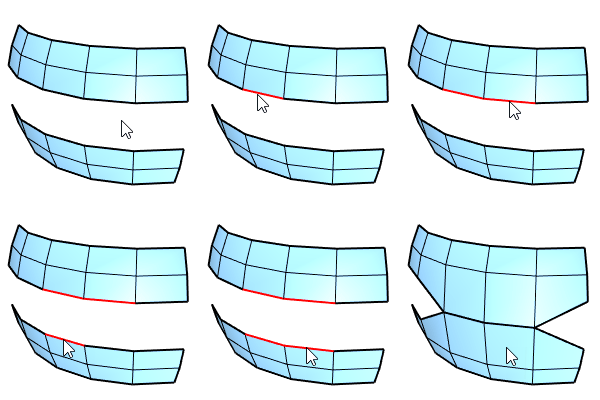
Input
- Mesh edges, vertices, control points
- SubD edges, vertices, control points
Example
-
Select the first set of edges, press Enter.
Or, select the first vertex.
-
Select the second set of edges, press Enter.
Or, select the second vertex.
The number of edges in both sets must match.
-
Pick the stitch location. Press Enter to stitch at the average location.
Or, select a stitch location option in the command-line.
- If the vertex or edge pairs belong to different objects, the two objects will be combined into a single object.
- Display SubD in Flat Mode by pressing Tab to help picking SubD vertices.
- Use preselect to stitch multiple vertices.
Command options
Edge selection mode
- (Default) Click selects a single edge. Double-click selects an edge loop.
Ctrl+click deselects a single edge. Ctrl+double-click deselects an edge loop.
- EdgeLoop: Click an edge to select an edge loop.
The clicked edge displays a brighter highlight than the other edges in the loop.
Ctrl+click the same edge to deselect the loop.
The Edges option also allows selecting a pair of vertices.
Stitch location
- Average: Right-click to stitch at the average location.
- First: Stitch at the location of the first set.
- Second: Stitch at the location of the second set.