Skip to content

What's New

RhinoArtisan 7

Now agentic. More RhinoArtisan than ever.

From the first idea to the finished piece, RhinoArtisan 7 brings AI, organic modeling, smarter settings and stone layouts, real-time rendering, automation and manufacturing into one jewelry workflow.

Artificial Intelligence

It doesn't describe the work. It does it.

Three ways in, one idea: the AI reaches your real tools. Same engines, same layers, same materials you use by hand. The geometry it leaves is parametric and editable, as if you had modelled it yourself.

Flagship · New in 7.0

RhinoArtisan MCP

Claude, ChatGPT or Gemini, plugged straight into RhinoArtisan.

Ask for an oval two-carat ruby with a half-carat round diamond on each side, and the stones are in your viewport. Same pipeline as QuickGems: right layers, right materials, sized to their carat weight.

Then keep going, in the same conversation. What it weighs in 18k. What it costs, with certified diamonds quoted live on Nivoda. Whether it is ready to print, where the metal runs too thin, the sprues, the STL, the production report.

And it composes with everything your assistant already does: your Claude Skills, your own prompts, the rest of your tools, all running now on real data from your own designs. MCP is the open standard the industry is converging on: Anthropic, OpenAI, Google and Microsoft all speak it. So does RhinoArtisan.

Local MCP server
Claude ChatGPT Gemini Copilot

Flagship · New in 7.0

Assistant, already inside

Built into RhinoArtisan, and it already knows the piece you have open.

Type “Change the main gemstone to Oval 1.50 cts” and the centre stone updates in the viewport, shape and carat weight together. Ask what it weighs in 18k white, set the ring size, export the STL, prepare the report: it reads the design you have open and runs the same commands you do. Anything that changes the document is proposed first, with Apply and Cancel.

It runs on the frontier models from Anthropic and OpenAI, and through OpenRouter on the best of the rest: Mistral in Europe, DeepSeek in China. One key, every model: pick the one that fits the task, the budget or your company policy.

And because the model runs online, it runs anywhere. No workstation, no dedicated GPU, no local setup: if RhinoArtisan runs, Assistant runs.

Runs on any computer

Claude GPT Mistral DeepSeek

Flagship · New in 7.0

Generative AI Studio

Nano Banana Pro, Kling, Veo, Meshy: the world's best generative models, working on your designs inside RhinoArtisan.

Images, video and organic 3D, each backed by a curated set of the leading models: Google's Nano Banana Pro for hero shots and campaign imagery, Kling and Veo 3.1 for product clips that move like the real thing, Meshy and Hunyuan for organic meshes you import into Rhino and keep editing.

The generative field moves monthly. The Studio keeps the best of it curated, current and one click from your viewport.

Images Video 3D Upscale
Documentation
Productivity

Everything you already have, put to work

Years of files, the hours behind them, the components your studio builds: RhinoArtisan 7.0 turns what you already own into things you can search, measure and share.

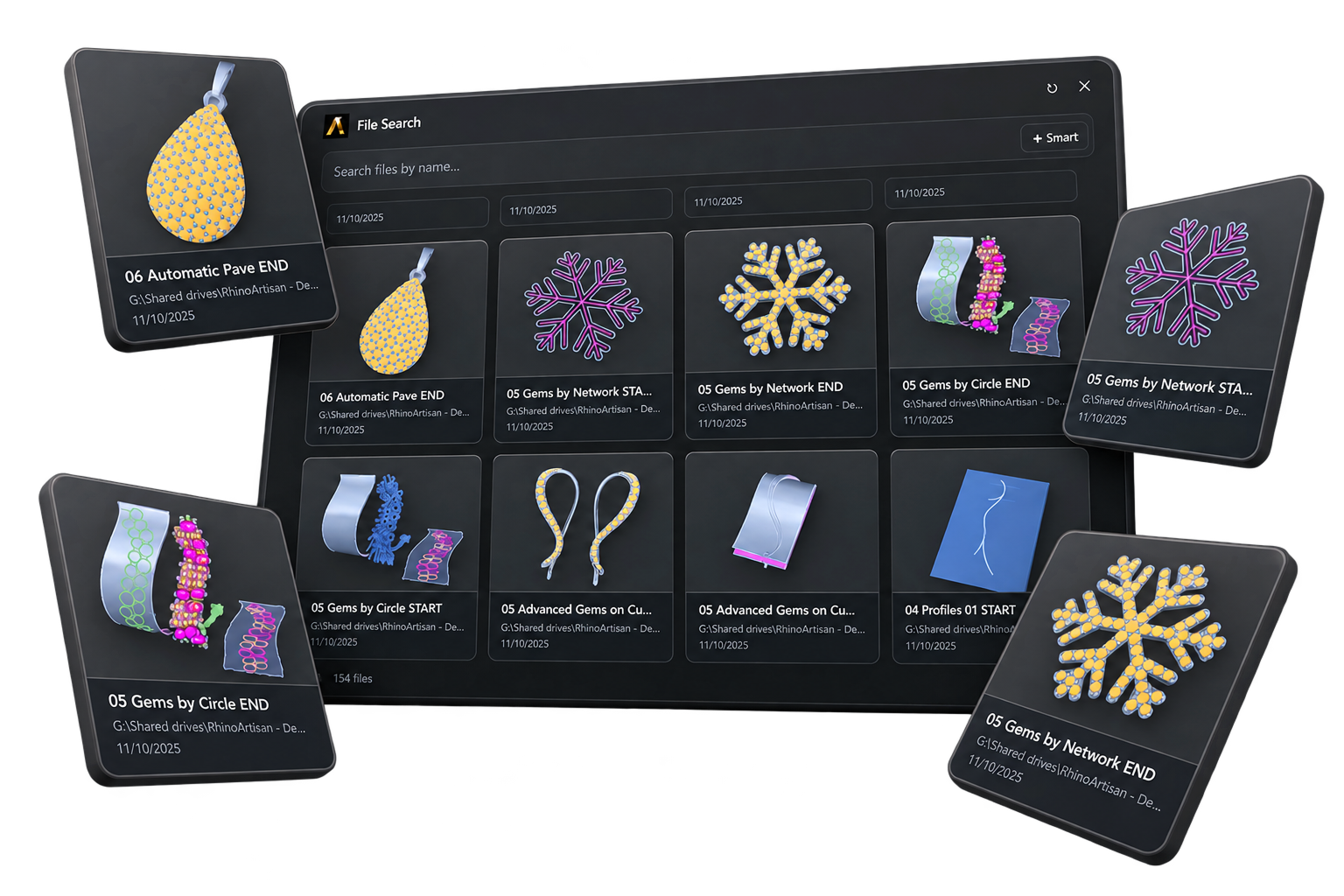
The File Search window over a folder of indexed designs, with result cards lifted out in front of it

Flagship · New in 7.0

Every design you ever made, one search away
Ten years of Rhino files, searchable like a library.

Advanced Indexing & Search reads your folders and turns them into a design library you can query by what is inside each file (the stones, the metals, the kind of piece) instead of opening files one by one until something looks familiar.

The design a client wants again becomes a query, not an afternoon of digging through folders.

Indexed by content, not filename

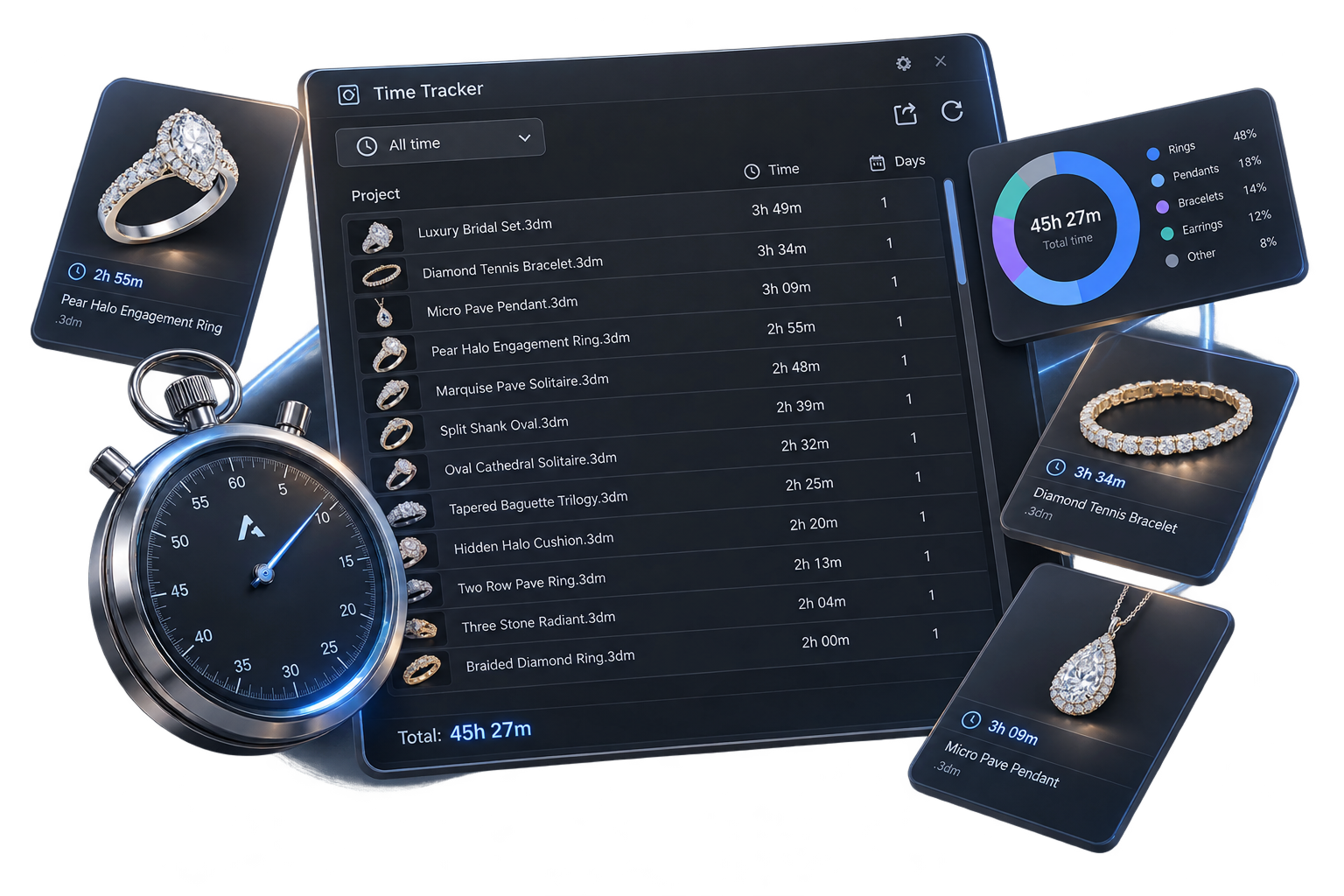
The Time Tracker panel listing design files with the hours logged on each, a 45h 27m total and a breakdown by piece type

Flagship · New in 7.0

The hours nobody writes down

Design time is the hardest part of a quote to defend, because nobody writes it down. Now it writes itself down.

Time Tracker records the hours on every file by itself: no timer to start, no button to forget. Step away and it pauses; come back and it resumes. The number it shows is one you can believe.

Open the panel and the real effort is there: hours per file, totals, a breakdown by piece type, ready for estimating, pricing and planning.

No start button. No stop button.

Standardize

Coming from RhinoGold, Matrix or MatrixGold? Your files come with you: Standardize organises the file, converts the gems, and hands it back clean, ready for pricing, reports and whatever tool you reach for next.

Parametric Boolean

Booleans usually end a design's editable life. These don't: union, difference and intersection that keep the parametric relations alive, so the pieces stay editable after they meet.

Import & Export Elements

Every parametric piece a studio builds (house shanks, bezels, peg heads) lives in one library file that travels. One person builds them, everyone else imports the whole set at once, and the team models with the same components.

Realtime Render

Stunning visuals. Instant approval.

Turn the design you are working on into real-time content a client can approve on the spot: effortless, instant, and live while you are still modelling.

Flagship · New in 7.0

No queue. No passes. Just the piece.

Open Realtime Render and your design is already there, orbiting, panning and zooming as fast as you can move the mouse.

Leave Live Update on and it follows your edits as you make them. Narrow a shank, change a prong count, swap the centre stone: the piece updates while you watch. Nothing to export, no scene to set up, no passes to sit through.

That changes two things. You stop guessing whether a proportion works; you see it. And when a client is standing beside you, you stop showing them a picture: you hand them the piece and let them turn it around.

Live Update

Documentation
Interface

A fresh interface. A joy to work in.

The whole interface has been reworked for 7.0: cleaner, calmer, more elegant. An environment where creating feels good, and where the commands you use most are always one click away.

Flagship · New in 7.0

Renewed down to the last icon

New icons, new submenus, new dialogs: the whole environment redrawn, cleaner and calmer. And inside it, two of the most requested features in RhinoArtisan.

The Quick Bar is a strip of favourite buttons under every ribbon tab. Right-click any command, choose Add to Quick Bar, and it stays there. It does not change when you jump from Shanks to Diamonds to Manufacturing, so the fifteen commands you use all day are always one click away.

Default Settings goes further: save your own default values command by command. If the default prong size is 1.5 mm and your work is always 2 mm, set it once and every command opens exactly the way you work.

Made to fit you

Gem Settings

Every way to hold a stone

Tulip, trellis, martini, azure, channel, hidden halo: RhinoArtisan 7.0 fills out the whole setting family, and gives you deeper control over how every prong, basket and bezel is built.

Flagship · New in 7.0

Advanced Basket

Build baskets around the design instead of adapting the design around the basket.

Round, double, triple, claw or custom-profile prongs, with configurable rails: enough control that the basket matches the proportions, the style and the manufacturing needs of each piece.

And it stays parametric and editable: the freedom does not cost you the workflow.

Documentation

Flagship · New in 7.0

Advanced Bezel

The metal around the stone is the whole setting, and Advanced Bezel gives you control over its shape.

Control the profile point by point, so the bezel adapts to the design instead of the design bending around a fixed shape.

It stays clean and production-ready throughout, and parametric, so the setting is still editable after the fact.

Documentation

Tulip

Prongs blooming from the stem like the flower it is named after: basket and prongs in one organic gesture.

Trellis

Curved prongs interwoven under the stone like a garden trellis: the classic style, parametric and consistent every time.

Documentation

Martini

Call it martini or cocktail: three prongs, a V-shaped silhouette, and as little metal as possible between the stone and the light.

Documentation

Azure

Openwork under the stone: less metal in sight, more light through the piece, and a build that stays structured.

Channel

Stones seated shoulder to shoulder inside a metal channel, and the layout work that used to be manual is now mostly automatic.

Hidden Halo

A halo tucked under the centre stone: invisible from above, sparkling from the side. Extra brilliance, silhouette untouched.

Documentation

The trilogy family

Past, present and future: the three-stone ring is the most storied composition in jewellery. Place a Three Stones set, then dress it: each of these builds its setting across all three stones at once, with the same engines as their single-stone counterparts.

Flagship · New in 7.0

Trilogy Trellis

The trellis, rebuilt for three stones: two prong systems that cross instead of one that repeats.

Trellis prongs are born at the side stones' inner girdle corners and descend to the ring curve, while blend prongs from the centre stone cross over them. The two systems are driven separately, so you can tune the grip on the centre and on the sides without one fighting the other.

Under-girdle rails run beneath the set: one for the centre, and the sides either follow it or break out onto their own parameters. Give it your ring curve or let it build one from the finger diameter, and switch between render and manufacturing geometry when the piece goes to production.

Shank prongs + cross prongs, driven separately

Trilogy Halo

A halo around each of the three stones, using the same halo engine, and the same accepted shapes, as the single-stone version.

Trilogy Bezels

Bezels across the set: one for the centre stone and a second shared by the two sides.

Trilogy East-West

Advanced baskets across the set: one for the centre stone and one shared by the two side stones.

Trilogy Individual

A setting chosen separately for the centre and for the sides (tulip, martini or advanced basket), so each part of the trilogy gets its own style.

Trilogy Tapered

Side stones tapering away from the centre, stepping the eye down from the main stone.

Trilogy Elevate Setting

The centre stone lifted above the sides, so the composition reads in three dimensions, not two.

Ring Design

Where every ring begins

The shank carries the stone, the comfort and most of the metal: it is the ring itself. From wedding bands to braided, bypass and split designs, 7.0 grows the family in every direction, and even estimates the size of a ring you did not build.

Flagship · New in 7.0

Advanced Cathedral

The shoulders rising toward the stone are what give the cathedral ring its name. Now you decide exactly how they rise.

Cathedral shanks live or die by that climb: too steep and the ring turns bulky, too shallow and the stone floats disconnected. Advanced Cathedral puts the rise under precise parametric control, for rings where the relationship between the shank and the centre stone is the design itself.

Wedding Band

The band that gets worn every day of a life: clean profiles and exact proportions, parametric from end to end.

Two Knife

Two knife-edges meeting along the band, catching the light on both ridges, with the proportions under precise control.

Classic

Where most rings start: the traditional construction, flexible enough to become almost anything.

Eternity

Stones all the way round, no beginning and no end. The shank arrives prepared for the continuous layout.

Pavé

A shank built around its stones from the start, with the geometry already prepared for the pavé it will carry.

Split

One band dividing in two as it approaches the stone, with the separation and its proportions under control.

Bypass

Two ends that never quite meet: they flow past each other around the centre stone.

Braided

Strands intertwined into one band: the braid built as real geometry, not a texture.

Graduated

A band that swells toward the top and slims at the back: progressive proportions, controlled along the whole ring.

Matching Bands

The band that follows an engagement ring: built to sit flush against an existing design, curve against curve.

Two Rows

Two parallel rows of stones on one shank, with the geometry ready to seat them both.

Estimate Size

A ring arrives with no size on record? Estimate reads the existing geometry and gives you the missing number.

Organic

Work it like wax. Keep it manufacturable.

A softened shank, a lion's head, a carved face: the organic side of jewellery used to mean a second program and a painful round trip. In 7.0 it lives with the rest of the piece: sculpt by hand, carve from images, generate from words, and stay manufacturable throughout.

Flagship · New in 7.0

Sculpt: any solid becomes digital clay

Sculpt turns any solid, surface, SubD or mesh into a piece of digital clay. You paint on it with a brush and the mesh deforms under the cursor, the way you would work wax on the bench.

Push and pull, clay, smooth, inflate, flatten, pinch, grab and mask, with symmetry, radial copies and live minimum-thickness control, so the piece stays manufacturable while you shape it.

The work that used to mean exporting to a sculpting program and importing back now happens in place, on the piece, with your parametric tools still an arm's reach away.

Never too thin to cast

Flagship · New in 7.0

Relief: greyscale becomes depth

Carve a relief into a surface from an image: a crest, a cameo, an engraved plaque, a textured face.

Relief reads an image as a height field: light becomes high, dark becomes low, and the whole thing lands on the surface as real, printable depth rather than a bump map.

Build it from a single image in one step, or stack several layers (profiles, extrusions, textures, projected geometry) and reorder them until the piece reads the way you want.

From image to printable depth

Flagship · New in 7.0

Text to 3D by AI

Some shapes are easier to describe than to model: a coiled serpent for a shank, a lion's head for a pendant, a knot of branches for a brooch.

Text to 3D turns that description into a textured organic mesh, generated by Meshy, the leading text-to-3D model, running on fal.ai inside the Generative AI Studio. Orbit the result in the interactive 3D preview, then bring it into Rhino with one click.

The generated mesh gives you proportions and character; the jewelry-grade surface comes from you: refine it with Sculpt like any other geometry.

Describe it → sculpt it

Gems & Pavé

A hundred stones. One decision.

Pavé is beautiful because it is dense, and dense used to mean slow. RhinoArtisan 7.0 automates the repetitive side of stone work: you decide where the stones go and how they look; the placing, the prongs and the cutters follow.

Advanced Gems by Curve with prongs and cutters in RhinoArtisan

Flagship · New in 7.0

Advanced Gems by Curve

Turn curves into editable stone layouts.

Pick a curve and the stones distribute along it parametrically: the count, the first and last sizes with everything interpolated in between, a second row if the design calls for it. Slide the end points to shorten the run, adjust, and the layout rebuilds instead of asking you to start over.

Then apply a predefined style, prongs and cutters included, without rebuilding a thing.

Parametric + Apply Style

Automatic Pavé

Point it at a surface and it fills with diamonds, sized and packed automatically. New range controls draw the borders: where stones should appear, and where they must not.

MicroSetting

All the infrastructure of fine pavé, from cutters and V-cutters to channel and row prongs, built production-ready for a whole run of small stones at once.

Gems by 2 Curves + Add Prongs

Two guide curves in, a finished layout out: the stones between them and their prongs, generated together in one operation instead of several.

Three Stones

Centre and sides, positioned and proportioned in one workflow: the starting point for the whole trilogy family of settings.

Tapered Baguettes on Curves

Pick two rail curves and click along one of them: every click places a tapered baguette spanning straight from that curve to the other. Each stone keeps its own gumball for length, widths and depth, plus an anchor point on each rail you can slide to reposition it.

Toi et Moi

The two-stone composition, built in one step: two independent stones straddling the ring top, each with its own shape, carat and material, placed with the mirrored lean and rotation the style asks for.

Reduce by %

Shrink every stone in a layout by a percentage, in one operation, with no recalculating size by size. Made for tolerances, tweaks and manufacturing reality.

Gem Tag & Gem View

Work with the data a stone carries, not only its geometry. Gem Tag attaches identification and metadata to each stone so it stays manageable through design and reporting; Gem View places editable, printable dots with every stone's dimensions in position, ready for a technical drawing.

Adjustable Emerald Chamfer

The chamfered frame an emerald cut demands, built around the stone in one step. And the chamfer itself is now yours to define, right in Gem Studio.

Manufacturing

From model to metal

A design is a promise until it casts. RhinoArtisan 7.0 closes the distance: repair that guarantees a printable file, sprues built parametrically, whole size runs with their weights, and the real cost of the piece, all before anything leaves your desk.

Flagship · New in 7.0

One ring becomes the whole size run

Design it once, deliver it in every size: Ring Resizer builds the whole run from one model.

Tick the target sizes off a list and it generates every one, faster to compute than before. In Variable mode the setting area stays untouched while the band adapts around it. Each copy can carry an identifying tag inside, even its sprue, and lands on its own layer or straight to STL, ready to print.

And because resizing changes the metal, it analyses the weight of every size and hands you the list: the numbers your quotes and your casting house actually need.

Every size, every weight

Flagship · Greatly improved in 7.0

STL Repair, rebuilt

A mesh that will not print is the last thing you want to discover at the printer.

Automatic Repair STL finds and resolves the problems that stop a file printing (open edges, multiple components) and hands back one watertight mesh. Work from the document's precision settings, or take control of minimum and maximum edge length and decimation yourself.

It finishes with a short report: whether the mesh is ready to print, how many components it ended up with (a correct STL has exactly one) and whether any open edges remain, so you know the file is good before it leaves your desk.

Flagship · New in 7.0

Breakdown Details: what the piece really costs

A complete, automatic cost breakdown of your design (metals, stones, processes and extras) in seconds, with no manual calculation and no spreadsheet to keep in sync.

Set your real numbers once in Breakdown Settings: live metal markets and your own alloys, melee priced by shape and by quality, printing, casting and setting labour. The panel then costs every component of the design on its own.

If the piece carries certified stones, an optional Nivoda connection searches their live stock against your preferences and suggests the three best matches, so the quote reflects real availability and real prices.

Export the result as Excel or JSON: for a spreadsheet, for your ERP, or as natural language to feed an AI assistant with real data from your own designs.

Excel · JSON · Natural language

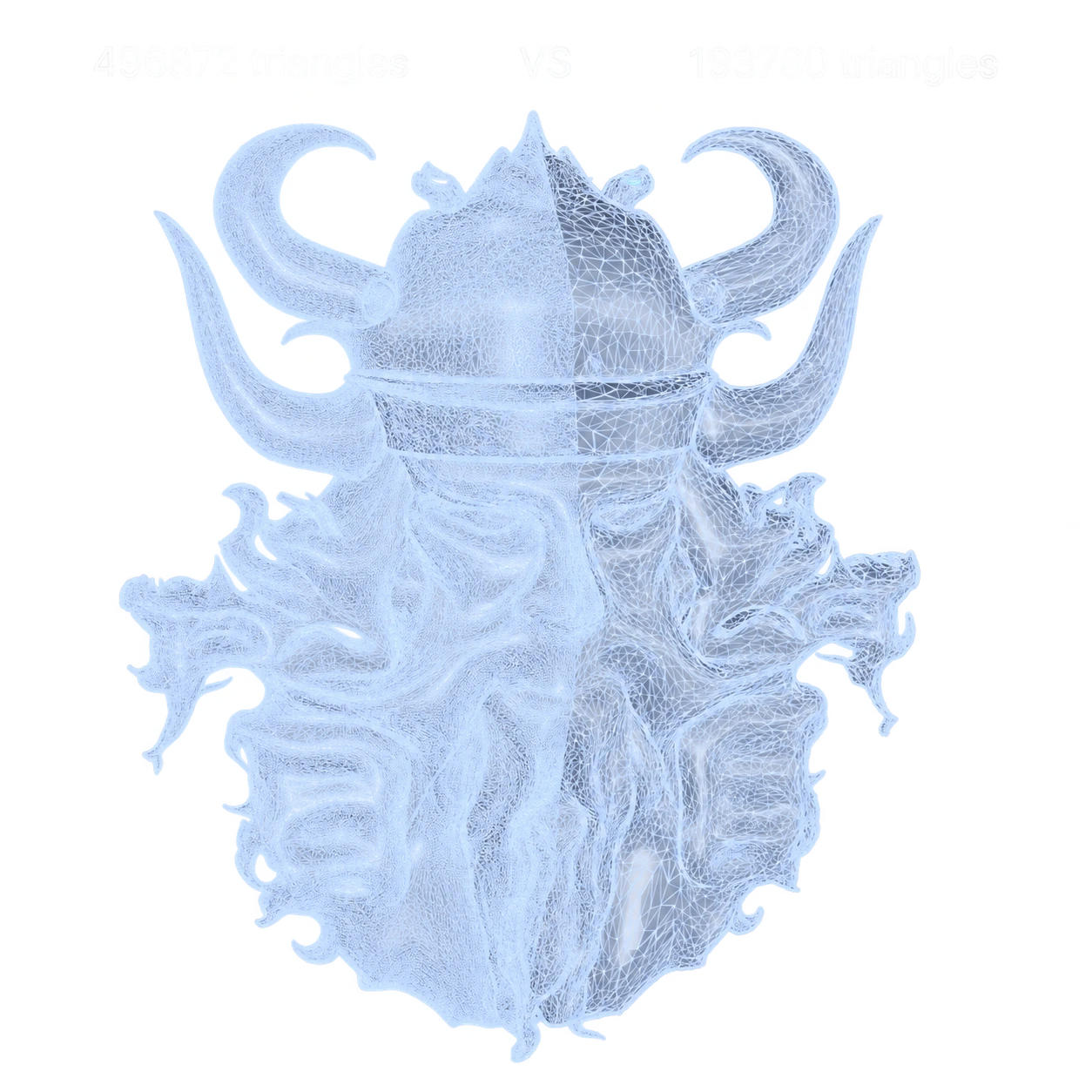
The same organic mesh side by side in RhinoArtisan: 496,872 triangles on the left, 193,780 after decimation on the right

Flagship · New in 7.0

A fraction of the mesh. All of the shape.

A detailed jewelry model turns heavy fast, and every orbit, boolean and save starts to drag.

Decimator simplifies the mesh while you work and Restore brings every polygon back when it is time to finish: you model light, you export heavy, and nothing is permanently given up.

For production runs, the mode that matters is by deviation, not percentage. A build plate loaded with 300 rings can choke the printer’s own software, and one percentage never suits every mesh. Set a deviation budget instead and each mesh reduces itself as far as its own shape allows, automatically, never straying past the tolerance you set.

By deviation, not guesswork

Processed Weight

The scale at the bench never quite agrees with the CAD volume. Processed Weight computes what the piece will actually weigh after manufacturing: the number your quotes should carry.

Custom Gem Weight Tables

A 2 mm round does not weigh the same from every supplier. Load your own gem weight tables and every count, carat and price follows your stones, not a generic standard.

Custom Metal Lists

Your alloys are not on anyone's default list. Import them from a CSV, with makings, density and price, and they appear in every weight, every breakdown, every report.

The complete sprue family

Nine ways to build the feed system, from feeding a single ring from the inside to a full casting tree, each one a parametric layout you place and adjust rather than model by hand.

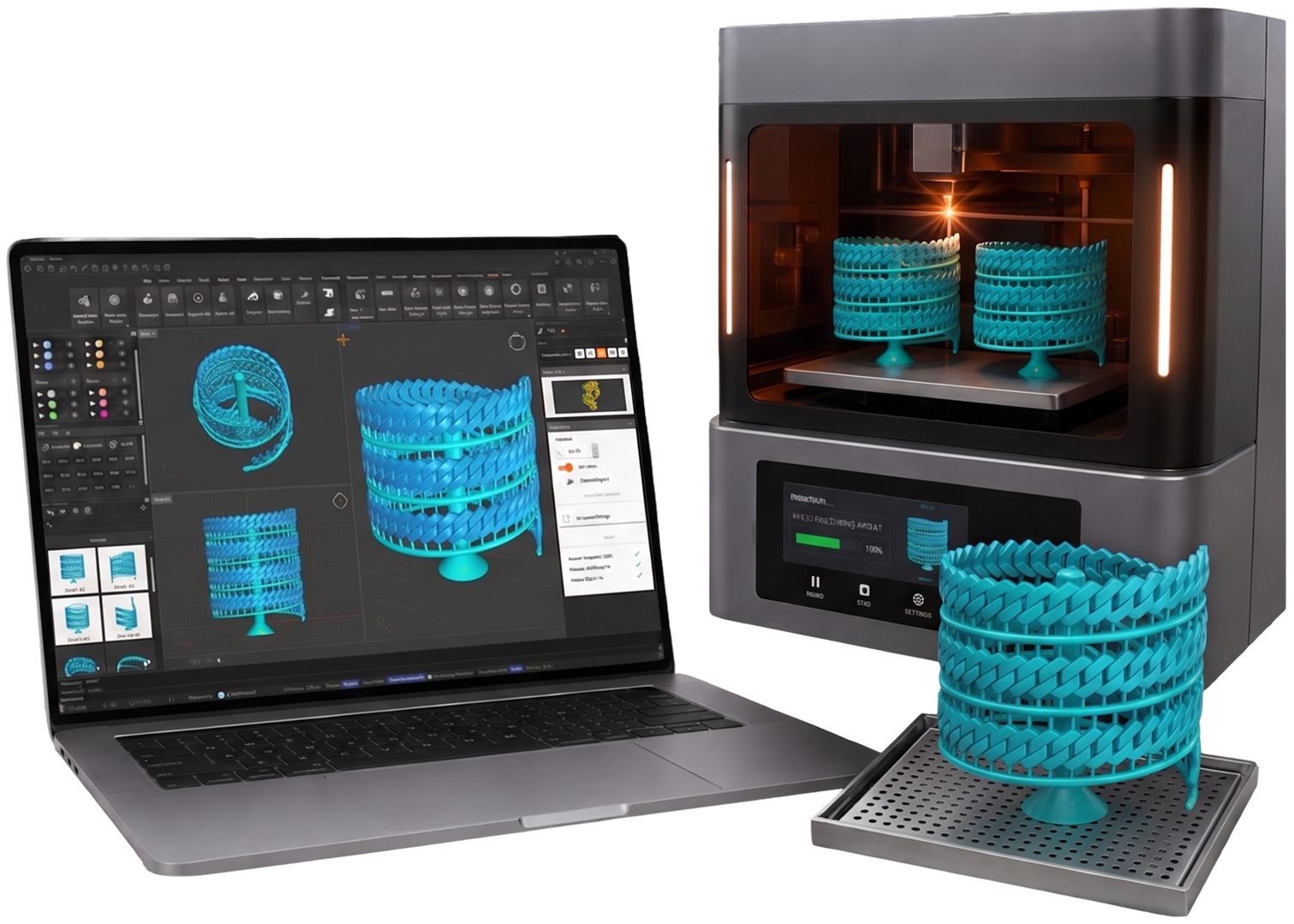
Sprued casting trees laid out in RhinoArtisan on a laptop, printing on a resin printer and lifted off the build plate

Flagship · New in 7.0

Advanced Sprue Design

The feed system decides whether a piece casts cleanly, and it is the part still modelled by hand.

Advanced Sprue Design turns it into a parametric layout instead: place the sprues where the metal should enter, set the height, the shape and the diameter at each end, and keep adjusting them without rebuilding the geometry.

It works alongside the nine sprue layouts below, from a single sprue on one ring to a full casting tree, so the whole feed system, one piece or a full flask, is prepared inside RhinoArtisan.

Parametric feed system

Inner tree & branches

Feed the piece from the inside: a trunk beneath the ring with branches reaching up to the band, or a central post through the finger hole feeding the inner wall.

External tree

A tapered trunk standing beside the piece, with branches to its outer surface.

External frames

A runner framing a row of pieces from outside, with paired stubs feeding inwards.

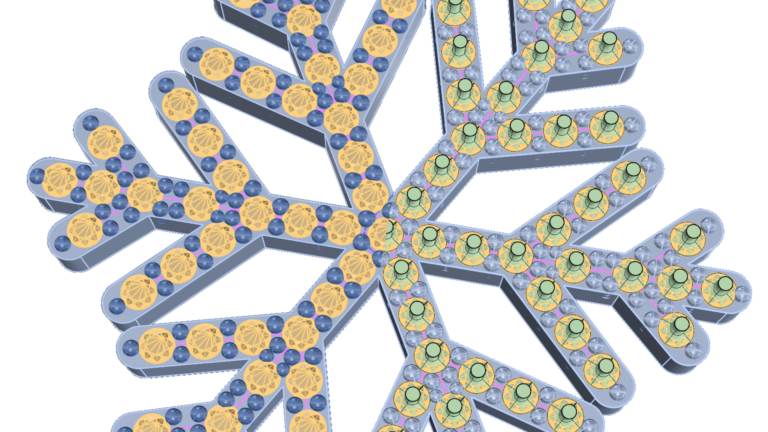
Tree

The classic casting tree: base, conical trunk and floors of branches, populated with copies.

Cluster tree

A crossed-helix cage with a node at every crossing, for dense loads.

Curve

A closed perimeter frame with connectors and an injection post, following your own curve.

Helix

Copies hung from a helical wire wound around a vertical trunk.

Spiral

The same idea coiled flat on legs, each piece on its own vertical connector.

Multiple copies

A tapered trunk between two picked points, with one curved branch per contact.

Grasshopper

The jewelry engine, on the canvas

Artisan for Grasshopper turns the same rings, settings and stones you build with the RhinoArtisan commands into parametric components you can wire together, drive from sliders and rebuild automatically when a value changes.

Artisan for Grasshopper

One definition. The whole collection.

Wire your jewellery into Grasshopper: move a slider and the finger size changes, the stones respace, the settings follow.

More than 240 components put the real RhinoArtisan engines on the canvas: shanks, stones, settings, accessories, exports. A Classic ring built here is the same Classic ring built from the toolbar, because it is the same code underneath: nothing is an imitation.

So one definition becomes the whole collection: every finger size, every carat, every metal, generated in a pass. And each builder emits its taxonomy and a semantic description alongside the geometry: the data a product configurator, a SKU or a spec sheet feeds on.

240+ components

Development

Do it once. Script the rest.

The work a studio repeats (a ring in every size, a collection in three metals, the same export and report on every production file) does not have to be done one file at a time. Describe the job and let RhinoArtisan write the script, or write it yourself against the same API the tools are built on.

Flagship · New in 7.0

Flow Studio AI

Your company just hired a software developer. Describe the job in plain language, and Flow Studio AI writes the script for it.

It generates Python against the RhinoArtisan scripting API, and it knows that API: the tools, their parameters and the commands it can run. So the script it hands you builds with gems, bezels and shanks, not with raw geometry, and the result stays as parametric and editable as anything you model by hand.

No programming required: describe, run, keep. Save what works and it becomes part of your library: automation you built by talking, ready for the next design.

Plain language → real RhinoArtisan tools

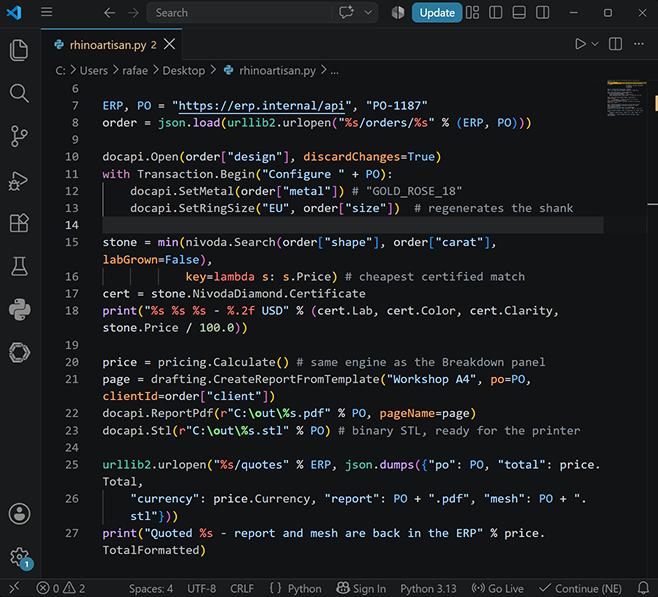
A RhinoArtisan Python script open in VS Code, pulling an order from an ERP and quoting, reporting and exporting it

For your developers

Python Scripting API

Everything you can do in RhinoArtisan by hand, you can do in Python.

The whole jewelry toolset (gems, settings, shanks, weights, pricing, manufacturing exports) exposed as clean, documented Python that runs a complete workflow with no dialogs and no mouse. A gem placed by script is identical to one placed by hand: same geometry, same data, same downstream tools.

Generate a ring in every size, a pendant in three metals, a whole collection in one pass. Drive stone counts and dimensions from a CSV of orders or from a customer configurator. Pull metal weights and stone lists straight from the model into your own quoting or ERP flow.

Mutations group into a transaction, so an entire scripted operation reverts with a single Ctrl+Z, and a bad argument gives you a readable message, not a stack trace.

Included in your license

Gems Settings Pricing Manufacturing

One release. The complete jewelry workflow.

Ask for a stone and it lands in your viewport. Sculpt like wax, price with your real numbers, print the whole size run. From the first idea to the cast piece, RhinoArtisan 7.0 is one environment, and it works the way you do.

RhinoArtisan 7.0

Discover RhinoArtisan 7.0

From the first idea to the cast piece: faster, with more control, and with AI that does the work, not just the talking.

Beta

RhinoArtisan 7.0 is still in beta, and so is this page. The features on this page are not final: anything can still be added, changed or removed before the final release.