Organic Modeling & Sculpting
Inset
 Inset
Inset
The Inset command inserts edges by offsetting the edges of selected mesh, SubD, or polysurface faces a certain distance inwards.
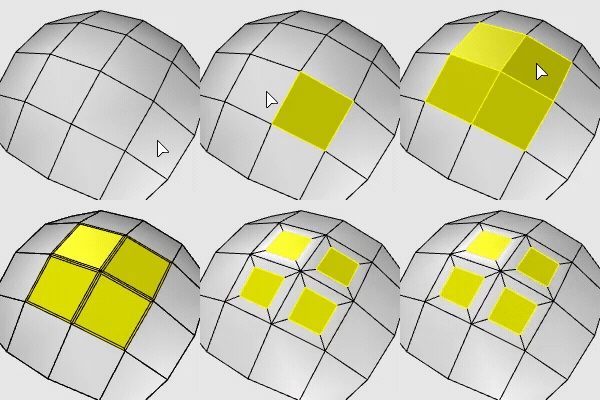
Input
- Mesh/SubD faces
- Surfaces and polysurface faces
To inset selected faces
- Select mesh, SubD, or polysurface faces.
- Enter a distance or pick two points to define the distance.
Command-line options
Mode (For multiple SubD faces only)
- Group (left) insets connected SubD faces as a unit.
- Single (right) insets SubD faces individually.
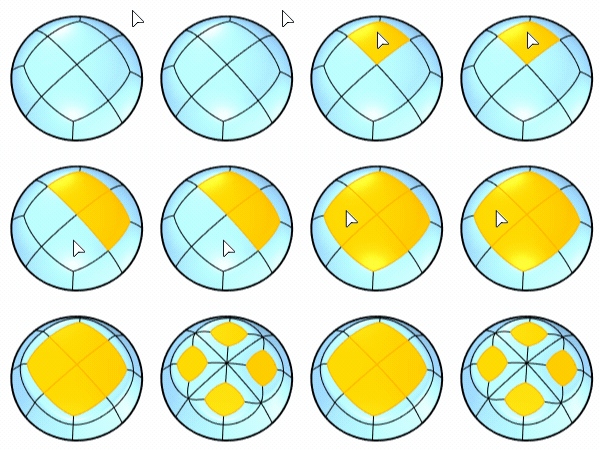
(Surface-only options below)
ThroughPoint
Pick a point for the inset curve to pass through.
Loose
Loose=On does not refine the inset curves to be in the system tolerance as Loose=Off does. The refinement process could be time consuming so the preview uses Loose=On to speed up.
IgnoreSeams
Ignores the seam of the input surface.
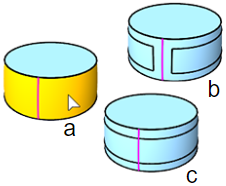
a) Input, b) IgnoreSeams=No, c) IgnoreSeams=Yes
Split
Splits the input surface; otherwise creates the inset curves only.
-
JoinOutputs
When Split=Yes, specifies whether the resulting surfaces will be joined.
For more information, please refer to the Rhino documentation.