Move
.png) Move
Move
The Move command options control mouse operation for selecting and dragging.
Steps
-
Select objects.
-
Pick a point to move from.
Press Enter to use the bounding box center of the object.
-
Pick a point to move to.
Command-line options
Normal
Moves objects in the normal direction of the picked location1 on another object2.
1 The picked location will be the “from” point.
2 The object can be a curve, surface, polysurface, extrusion, or SubD.
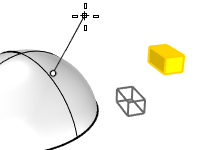
Vertical
Moves objects perpendicular to the current construction plane.