Halo Ring with Cathedral Shank
Lesson 6 of 49
Shank
Sign in to access this lesson
This lesson is part of Crafting Engagement Masterpieces, which can come bundled with a RhinoArtisan Commercial license subject to current promotions. Log in with your customer account, or get in touch and we'll set you up.
Customers only
Solo para clientes
This lesson is part of Crafting Engagement Masterpieces, which can be included with a RhinoArtisan Commercial license subject to current promotions. If you've already purchased and don't see it in your account, get in touch.
Objective: Design the shank using the cathedral setting.
Step 1: Go to the “Shanks” tab and select the “Cathedral” command.

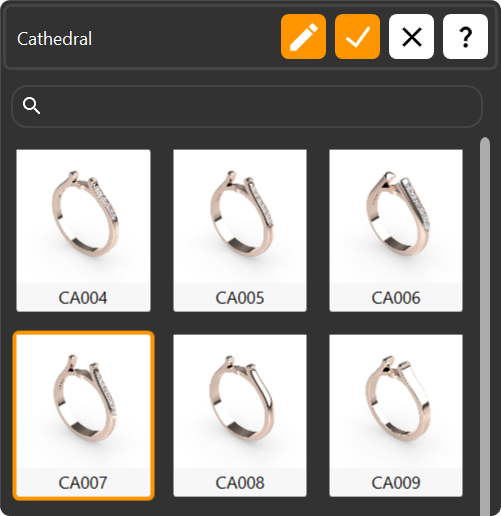
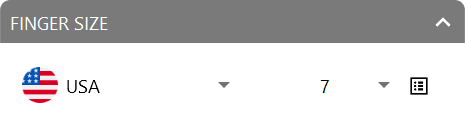
Step 2: Choose the CA007 model for the shank and press “Edit.” Adjust the region to “United States of America” and set the ring size to 7.
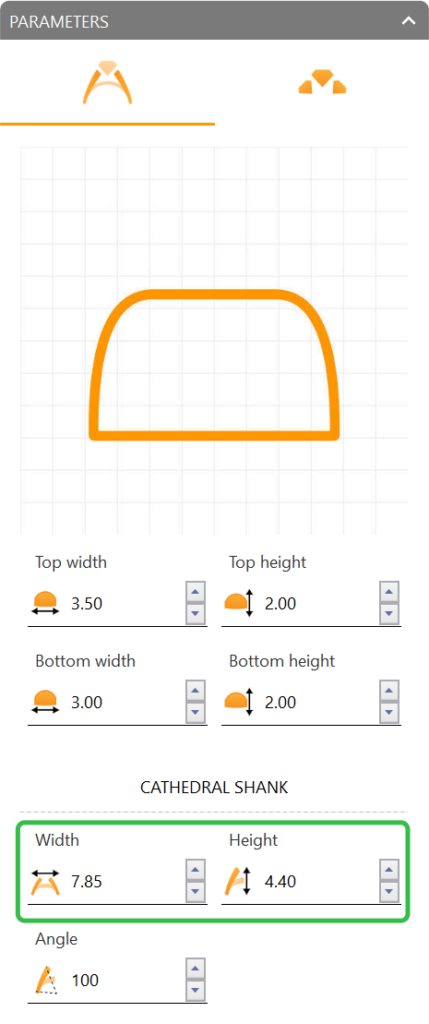
Step 3: In the cathedral shank parameters, adjust:
- Width: 7.85 millimeters.
- Height: 4.4 millimeters.
Video Lesson
Next Step
Add gems to the shank.
Almost there — you still have some lessons to complete. Jump to the next one →
Impersonating — progress and reviews are disabled.
Course completed
You've completed Crafting Engagement Masterpieces 🎉
Great work. Get your certificate of completion and, if you have a minute, let other jewelers know what you thought of the course.